Part of the Technology photoes in this website are created by rawpixel.com - www.freepik.com

Falcon 5012

Empowering Generative AI with Flexibility and Efficiency

  • GPU dynamic provisioning
  • 4U 19” disaggregated GPU solution
  • 8 dual slots for GPUs, 4 slots for NICs, and 2 slots for retimers
  • 4 (x16) server host configuration

Overview

Revolutionizing Generative AI: PCIe Gen5 GPU Solution Meets the Growing Demands

The PCIe Gen5 GPU solution revolutionizes the field of generative AI, satisfying the escalating demands by enabling the independent deployment of GPUs at a larger scale. Achieved through a composable architecture and the innovative approach of composable disaggregation, this solution significantly impacts data-intensive tasks. It enhances transfer speeds and overall performance while isolating GPUs from the server while providing flexibility and scalability. The simplified hardware management in independent GPU expansion further contributes to cost savings. Overall, the PCIe Gen5 GPU solution meets the substantial GPU demands in generative AI, delivering enhanced performance, flexibility, and cost-effectiveness.

Revolutionizing Generative AI: PCIe Gen5 GPU Solution Meets the Growing Demands

Next-Level System Dynamics: Breakthrough GPU Functionalities

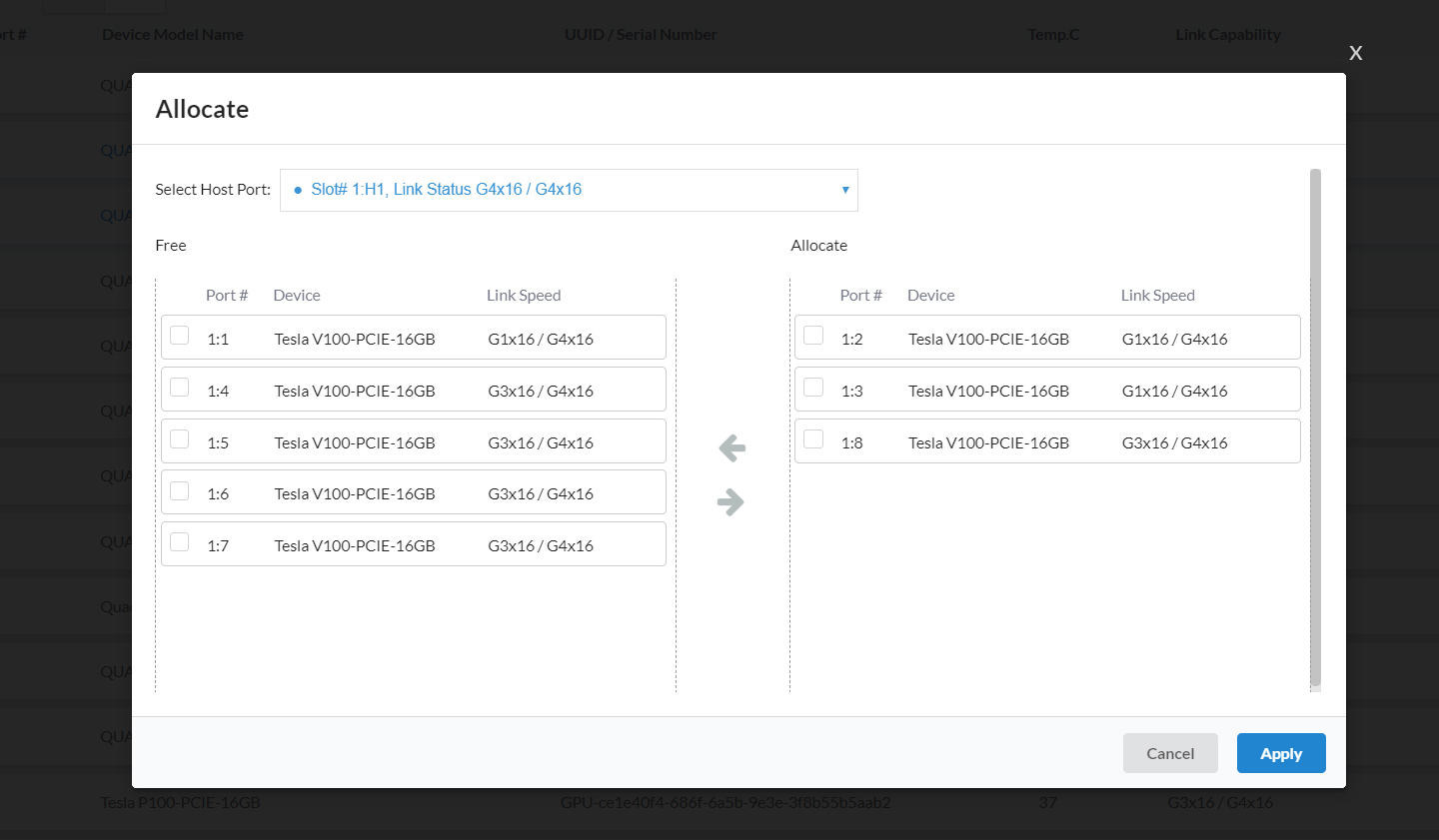
Revolutionizing system dynamics, Falcon 5012 introduces advanced GPU management, enabling up to 8 hosts to dynamically share 10 devices on demand. This streamlines resource allocation, saving significant setup time. The solution allows seamless removal and addition of GPU resources between hosts, ensuring intelligent rearrangement. IT administrators benefit from the cohesive hardware and software solution, focusing more on gaining insights and less on component management. Falcon 5012 makes your workflow more efficient and effective.

Next-Level System Dynamics: Breakthrough GPU Functionalities

Comprehansive Resource Management with RESTful API and GUI

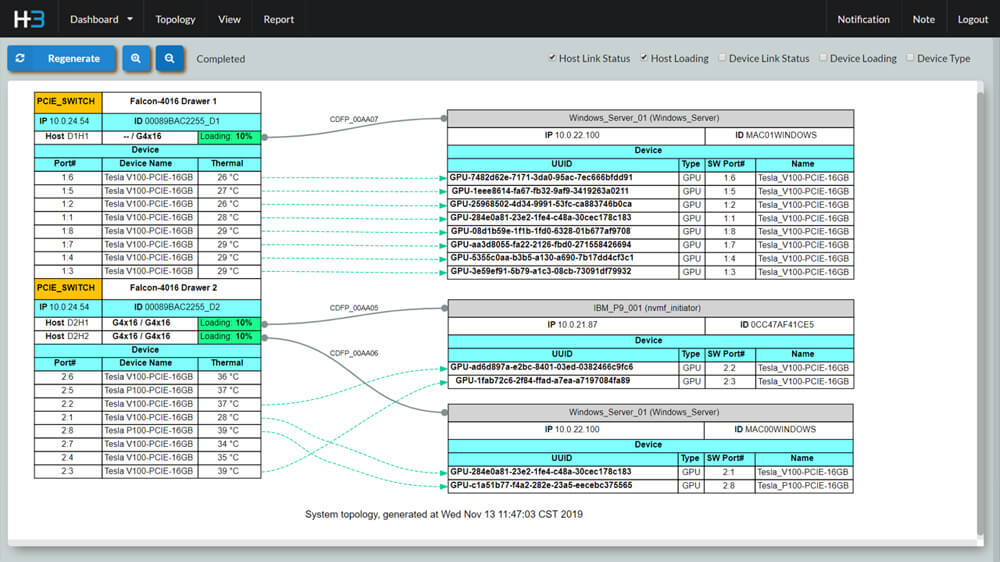
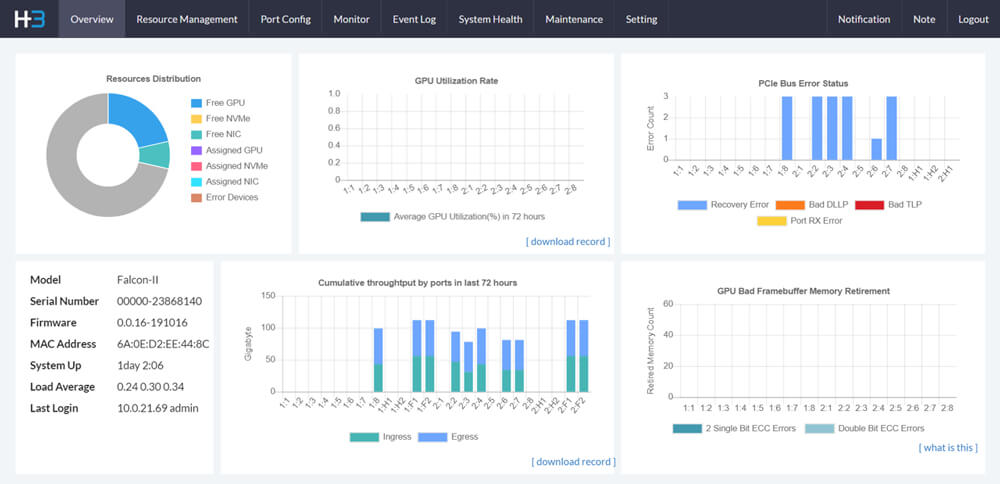
Falcon 5012 ensures optimal system performance through strategic resource management. Actively monitoring GPU health, real-time performance, and errors in both host and device ports facilitates quick issue identification and resolution for stable operation. Introducing flexible switch cascade topologies and configurable host virtual trees enhances resource management flexibility. The solution also provides intuitive resource allocation insights through the Host and GPU views, enabling intelligent resource deployment.

Comprehansive Resource Management with RESTful API and GUI

Specification

Software Features

Features
  • GPU composability
  • GPU hotplug
  • GPU peer to peer (GPU P2P)
  • PCIe port configuration to host/device ports
  • Power control of a single PCIe slot
  • GPU health information
  • Performance and error monitoring of host and device ports
  • Flexible switch cascade topology
  • Flexible switch fabric topology
  • Configurable host virtual tree
  • Host view of assigned GPU
  • GPU view of assigned host
  • Temperature threshold setup
  • Device overheated protection
  • Firmware secure boot
  • Link capability and status of devices
  • User authentication management
  • 256bit encryption of sensitive data
  • Sha128 encryption
  • ELK central log server integration
Management Interface Redfish®, RESTful API, GUI
System Management
  • H3 management center
  • Real-time GPU cluster topology
  • Dashboard for GPU utilization, performance and other information
  • Predictive health monitoring
  • Role-based authentication and access control

Hardware Features

Model Name Falcon 5012
BMC AST 2500
mCPU Intel ATOM X86 CPU
PCIe Switch Broadcom PEX 89144 PCIe 5.0 switch
Device GPU, FPGA, network card, and other standard PCIe device (add-in card)
Dual-slot width and 10.5” length
Supports up to 600W GPU
Host Interface - Standard mode
  • One (1) PCIe 5.0 x16 CDFP connector
  • Need one HBA (host bus adapter) card on server host
  • 1m CDFP cable
Host Interface - Advanced mode
  • Up to Four (4) PCIe 5.0 x16 ports for host connections
  • Need HBA (host bus adapter) cards on server hosts
  • 1m CDFP cables
Operating temperature 10 degrees Celsius ~ 35 degrees Celsius (50 degrees Fahrenheit ~ 95 degrees Fahrenheit)
Ethernet Ports
  • RJ45 of mCPU for memory management
  • RJ45 of BMC for chassis management
Power Four (4) pieces 2100W or 3200W (2+2 or 3+1 redundant), back removable, hot-swap
Fan
  • 8 80x80mm dual rotor fans
  • Hot-swap
Dimension
  • 4U; 175(H) X 448(W) X 650 (D)mm

Compatible Device

Accelerator
  • NVIDIA A100, A40, A30, A16, A10
  • NVIDIA RTX 6000 PRO, RTX A6000, RTX A5000, RTX A4000
  • NVIDIA GeForce RTX 4090, GeForce RTX 4080, GeForce RTX 3090
  • NVIDIA H200, H100
  • AMD Radeon Instinct™ MI60, MI50, MI25
  • AMD Alveo™ U50

Topology

Overview

The Falcon 5012 supports two scenarios: 10 GPUs or 8 GPUs + 4 Network cards, configurable in Standard Mode or Advanced Mode. Advanced Mode, requiring a Premium License, enables flexible, high-performance deployments.

1. 10 GPUs

Application scenariosStandard ModeAdvanced Mode
10 GPUsa. 2 Hosts + 10 GPUsb. 4 Hosts + 10 GPUs
c. 6 Hosts + 8 GPUs

2. 8 GPUs (FHFL 312mm length) + 4 Network cards

Application scenariosStandard ModeAdvanced Mode
8 GPUs + 4 Network cardsd. 2 Hosts + 8 GPUs + 4 Network cardse. 4 Hosts + 8 GPUs + 4 Network cards
f. 6 Hosts + 8 GPUs + 2 Network cards
g. 8 Hosts + 8 GPUs

1. 10 GPUs

a. Standard Mode - 2 Hosts + 10 GPUs

ConfigurationChassis-wide configurationPer-switch configuration
Host port + Device port2 Hosts + 10 GPUs1 Host + 5 GPUs

In the 10 GPUs scenario, each host can independently access the GPUs connected to its switch under Standard Mode.

Figure 1

Figure 1. Block diagram of Standard Mode architecture topology with 2 x16 hosts and 10 GPUs


In the 10 GPUs application scenario under Advanced Mode, two configurations are available.

b. Advanced Mode - 4 Hosts + 10 GPUs

ConfigurationChassis-wide configurationPer-switch configuration
Host port + Device port4 Hosts + 10 GPUs2 Hosts + 5 GPUs

In Advanced Mode, each switch supports 2 hosts and 5 FHFL devices. With 2 switches, the system can connect 4 hosts and 10 FHFL devices.

Figure 2

Figure 2: Block diagram of Standard Mode architecture topology with 4 x16 hosts and 10 GPUs

c. Advanced Mode - 6 Hosts + 8 GPUs

ConfigurationChassis-wide configurationPer-switch configuration
Host port + Device port6 Hosts + 8 GPUs3 Hosts + 4 GPUs

External expansion slots can be connected to retimers to support additional hosts. In this configuration, each switch supports 3 hosts and 4 FHFL devices, allowing 2 switches to connect a total of 6 hosts and 8 FHFL devices.

Figure 3

Figure 3. Block diagram of Advanced Mode architecture topology with 6 x16 hosts and 8 GPUs


2. 8 GPUs + 4 Network cards

d. Standard Mode-2 Hosts + 8 GPUs + 4 Network cards

ConfigurationChassis-wide configurationPer-switch configuration
Host port + Device port2 Hosts + 8 GPUs + 4 Network cards1 Host + 4 GPUs + 2 Network cards

In the 8 GPUs + 4 Network cards scenario under Standard Mode, each host can independently access 4 GPUs and 2 Network cards on its connected switch.

Figure 4

Figure 4. Block diagram of Standard Mode architecture topology with 2 x16 hosts and 8 GPUs + 4 NICs

e. Advanced Mode - 4 Hosts + 8 GPUs + 4 Network cards

ConfigurationChassis-wide configurationPer-switch configuration
Host port + Device port4 Hosts + 8 GPUs + 4 Network cards2 Hosts + 4 GPUs + 2 Network cards

In Advanced Mode, each switch at least supports 2 hosts, 4 FHFL devices, and 2 single-slot devices, enabling the system to connect 4 hosts, 8 GPUs, and 4 Network cards.

Figure 5

Figure 5. Block diagram of Advanced Mode architecture topology with 4 x16 hosts and 8 GPUs + 4 NICs

f. Advanced Mode - 6 Hosts + 8 GPUs + 2 Network cards

ConfigurationChassis-wide configurationPer-switch configuration
Host port + Device port6 Hosts + 8 GPUs + 2 Network cards3 Hosts + 4 GPUs + 1 Network card

Users can designate one of the external expansion slots to connect additional hosts. In this configuration, each switch supports 3 hosts, 4 FHFL devices, and 1 NIC, enabling the chassis to support a total of 6 hosts, 8 FHFL devices, and 2 single-width devices.

Figure 6

Figure 6. Block diagram of Advanced Mode architecture topology with 6 x16 hosts and 8 GPUs + 2 NICs

g. Advanced Mode - 8 Hosts + 8 GPUs

ConfigurationChassis-wide configurationPer-switch configuration
Host port + Device port8 Hosts + 8 GPUs4 Hosts + 4 GPUs

Users can designate external expansion slots to connect additional hosts. In this configuration, each switch supports 4 hosts, and 4 FHFL devices, enabling the chassis to support a total of 8 hosts, and 8 FHFL devices.

Figure 7

Figure 7. Block diagram of Advanced Mode architecture topology with 8 x16 hosts and 8 GPUs

For more information, please contact sales@h3platform.com for license purchase.

Request a Demo

If you want to apply for any product display, please write a form and we will contact you after receiving the message.

Technology photo created by rawpixel.com - www.freepik.com